Official hotline:021-61905265
Current location: Home > Product Center > Hardness meters > Microwidth > Automatic micro-wield hard measure hard meters FY-HVS-100 MZZ-XY

Automatic micro-wield hard measure hard meters FY-HVS-100 MZZ-XY

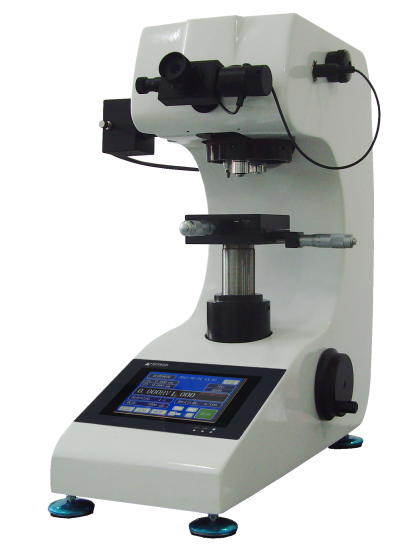
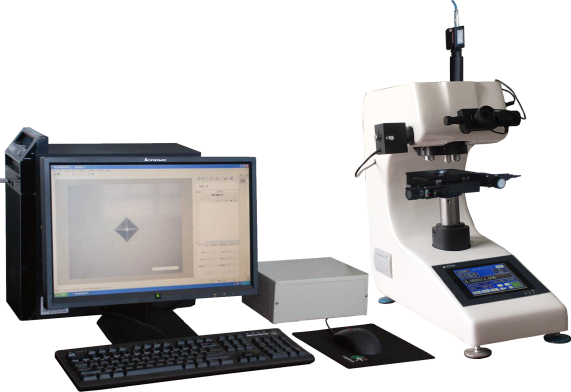
The FY-HVS-1000MSZ-XY AMS is a (set) image collected through a high-precision CCD, image acquisition system, and a (set) micro-mixed hard system developed to measure and calculate the diamond-forming footprints generated by the accurate processing of the collected images. The system is hosted by a large integrated aluminium, with a small long-term performance of the casting aluminium shell to stabilize natural deformations, and eight-phase coded loads are more purer loads.The micro-vivid hardness measurement system is applicable to the μwidth hardness of various metals and parts of non-metal materials, and allows for the determination of hardness of various parts (mechanical processes, exercise, casting iron, casting steel, etc.), non-ferrous metals and heat-processing parts, as well as for thermal impact determination of effective hard layer depth, coating and welding. It can also be used for observation of gold-phases within metal parts and for the collection, display and printing of images.
Product Advantages
✪XY sample movement control:System provision(a) XY Mobile Sample Table; Z-axis pole control, manual focus; XY can move simultaneously; XY can finely adjust to the key to the key;

✪Camera: 1.3M pixel CCOS USB2.0 camera, other optional;

✪(b) The system provides various load modes, including along the line, along the edge, along the edge of the curve, etc.; the loading point coordinates are set at all times;

✪Automatically loosing the edge: autoscan along the edge of the sample and automatically finding the turning point, such as the tooth-cap root;

✪Autoloading, automeasurement after a single-time hand-orientation: autoloading, automeasurement and auto-scrutinizing of a hardened curve by the set load mode of the one-time focus system;

✪(b) The system can also convert measured wilness values to multiple other hard-scale scales such as HB, HR, etc.; the measurements of the ball-surface cylindrical sample may be amended; and the sample measurements may be effectively validated;

✪(a) Data statistics: automatic calculation of the averages, variance, Cp, Cpk, etc. of the measurements of hardness;

✪Data storage: measures data and images, etc., can be stored in a document for subsequent release;

✪Test report: Auto-generated WORD or EXCEL document report; user-specific report format; standard format includes each hard measure, statistical value, laminated image, and hard curve; user can also enter custom additional information for reporting; test data can also be sent to the specified web port.

✪Nuidium hardness: can be set to Nuidian hardness measurement;

✪Fracking resilience: can be set to measure the fracture resilience of the pressure marks;

✪Other functions: (a) All functions of the iVision-PM microimage processing and measurement system, including image filming, marking, image processing, geometric dimension measurement, document labelling, album management, and fixed-multiplier printing;

✪Manual modification: Measurement allows for easy and manual mouse drag and drag to modify the lacquer mark, and measurements and statistical results will be automatically updated

Technical Specifications

Model

FY-HVS-1000MSZ-XY

Compatible test force

10gf (0.098N)、25gf (0.245N)、50gf (0.49N)、100gf (0.98N )、

200gf (1.96N)、300gf (2.94N)、500gf (4.9N)、1000gf (9.8N)

Implementation standards

Precision in GB/T4340.1 GB/T4340.2  IS06507-2  ASTM_E384

Test force application method

Automatic (gaff, bob, deload)

XY Sample table and movement control

The system provides a mobile XY sample table:

1.XY Process: 50 mm*50 mm surface dimension: 110 mm x 110 mm, repeat accuracy<2um;routing and size custom

2. Automatic edge scanning: autoscan and depict the whole map of the edge of the sample along the edge of the sample for use in the loading path planning, suitable for hardness measurements that need to be taken at the specific location of the sample

3. XY can be moved at any speed

4. Move or rise by pressing the direction button or keyboard or by entering a moving distance, etc.

Load Mode and Path Settings

Load Path Settings provide the following mode:

1. Across the route; 2. Azimuth along the route; 3. Free click; 4. Azimuth; 5. Azimuth; 6. Multiple lines along the curve; 7. Acronyms along the curve; 8. Circumcular arc; 9. Cartiental; 10. Parallel to the top; 11. Automatic angle along the edge band; 12. Automatically following the edge matrix; 13. Circles.

Automeasure

Automatically loads the hardness values by the specified loading path, automatically measures the pressure marks and automatically draws the harding curve; one key completes:

1. Minimum HV can be set and measurement automatically stops when it reaches that value

2. After the measurement is completed, the additional point can be added to the original path

3. The measurement image at each point is saved for final manual correction; only the mouse drag-and-drop-trace quadrilateral border, hard measure values, statistics, and measurements of image book, etc., are required for the amendment

Camera and calibration management

1.1 million pixels USB2.0 CCOS dedicated to microscope measurement cameras (3 million pixel cameras optional)

2. The camera may be marked by hard-scale blocks or by two methods:

3. To improve measurement accuracy, different test forces can be separated and systems automatically loaded

Hardness conversion, fixation, validity validation

Hardness conversion: measured wilness values can be converted to a standard, national or other hardness values such as HB, HR, etc.;

Hardness correction: The measurements of the spherical or cylindrical samples may be amended;

3. Validity verification: Calculate the smallest sample thickness, the distance from the test point to the edge of the sample, and the distance from the test point based on the measured hardness value

Data statistics

Autocalculates the mean, variance, Cp, Cpk, etc. statistical values of the hardness

Stuck Curve

Automatically draw a hardened curve:

1. Multiple harding curves or single curves by average can be generated automatically under a measurement path;

2. Hardened curves for HV-XY can be drawn

Data storage

Original measurement data and images, etc., can be stored in documents for subsequent call-out reports; a file saves all data from a measurement

Test report

Auto-generated WORD or EXCEL document reports; report formats are custom-able; standard formats include hardness values, statistical values, laminated images, and hardened curves for each measurement point

Nuzid Hardness

Set to Nuidium Hardness Measurement

Fractal resilience

Set to measure the fracture resilience of the pressure marks

Other functions

Includes image/video filming, image processing, geometric dimension measurement, document labeling, album management, and fixed-multiplier printing; document labeling can input text, list, and pictures on images, etc.

1.Standard configuration of hard meters 

Name

Number

Name

Number

Axes

One.

Wing

Six.

Cross-platform

One.

Slender-Stealed Platoon

One.

- The table is flat.

One.

- The Visible.

One.

Screwed knife.

Two.

Horizontally calibrated screws

Four.

10x microscope

One.

Micro Hard Block

Two.

Second light bulb (Present)6V/12W)

Two.

The back-up fuse.1A

Two.

Horizontal

One.

Product Qualification Certificate

1

Product use instructions

1


2.Standard configuration of measurement software

Name

Number

Name

Number

XY powered shift desk

One.

XY Step Drive

One.

Powerline

One.

USB Connection

One.

XY Connection

One.

RS232 line

One.

1.3 million special cameras.

One.

Software installation CD-ROM

One piece.

Encrypted Dog

One.


Download

Download Materials:

Order

Thank you for your attention to Fuyun products and solutions! Please fill out the following form to make us aware of your needs.

Marked*- You're not gonna get it.

  • Product Type*
  • Laboratory Type/Application*
  • Samples/Week*
  • Name*
  • Company*
  • Department
  • Email*
  • Phone*
  • Fax
  • Other
  • Submit Message Reset Message